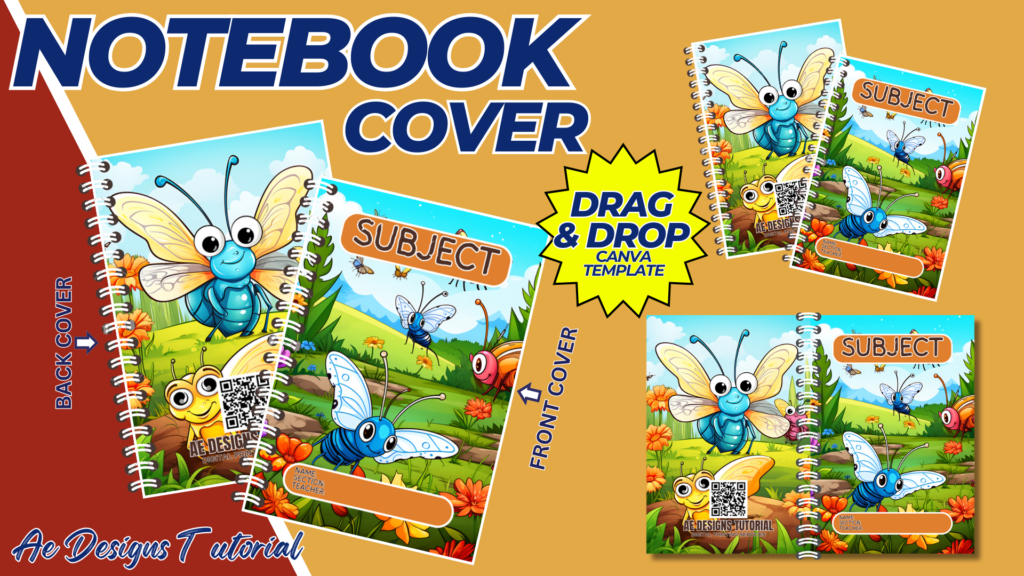
Creating a butterfly-themed notebook cover can be an enjoyable and creative project. This guide will walk you through the steps to design an eye-catching and beautiful butterfly notebook cover template using Canva, an easy-to-use online design tool.
1. Purpose and Benefits
Purpose:
- To create a visually appealing and themed cover for notebooks.
- To provide a personalized and attractive design for students, children, or anyone who loves butterflies.
Benefits:
- Enhances the aesthetic appeal of notebooks.
- Encourages creativity and personalization.
- Makes notebooks easily identifiable.
2. Materials Needed
- Computer with internet access
- Canva account (free or Pro)
- Printer
- A4 size bond paper or cardstock (for printing the cover)
- Notebook (to apply the cover to)
- Scissors or cutting tool
- Glue or double-sided tape (if applying the cover to an existing notebook)
3. Designing the Butterfly Notebook Cover in Canva
Step-by-Step Design Process:
- Create a Canva Account:
- Sign up for a free account at Canva.
- Start a New Design:
- Click on “Create a design” and select “Custom dimensions.” Set the dimensions to 8.5 x 11 inches (standard notebook cover size).
- Select a Background:
- Choose a background color or pattern that complements the butterfly theme. Soft pastels or vibrant colors can work well depending on your preference.
- Add Butterfly Images:
- Use Canva’s search bar to find high-quality images or illustrations of butterflies. You can also upload your own images if you have specific designs in mind.
- Position the butterflies in a visually appealing way. You can create a pattern, a focal point, or a scattering effect.
- Incorporate Additional Elements:
- Floral Designs: Add flowers, leaves, or vines to enhance the natural theme.
- Text: Include a title or name, such as “My Notebook” or the owner’s name. Use decorative fonts that match the theme.
- Add Borders and Frames:
- Consider adding a border or frame to give the cover a finished look. Lace or vintage-style borders can complement butterfly designs nicely.
- Finishing Touches:
- Ensure all elements are balanced and aligned. Check for any empty spaces that might need additional decoration.
- Adjust colors, sizes, and positions to create a harmonious design.
- Download and Print:
- Once your design is complete, download it as a high-quality PDF for printing. Choose “PDF Print” for the best resolution.
4. Applying the Cover to a Notebook
- Print the Cover:
- Print the design on A4 size bond paper or cardstock for better durability.
- Cut the Cover:
- Carefully cut along the edges of the printed cover using scissors or a precision cutting tool.
- Attach the Cover to the Notebook:
- Apply glue or double-sided tape to the back of the printed cover.
- Carefully position and attach the cover to the front of the notebook. Press firmly to ensure it adheres well and smooth out any bubbles or wrinkles.
5. Enhancing the Notebook Cover
Personalization:
- Add the owner’s name or a special message.
- Include a space for subject labels or dates.
Interactive Elements:
- Add small pockets or flaps inside the cover for holding notes or small items.
- Include a bookmark or page marker attached to the cover.
6. Practical Applications
School Notebooks:
- Create themed covers for different subjects to make organization easier.
- Encourage students to personalize their notebooks to increase their interest in schoolwork.
Journals and Diaries:
- Use the butterfly cover for personal journals or diaries.
- Make it special by adding inspirational quotes or personal mottos.
Gift Notebooks:
- Design a beautiful butterfly cover for a notebook to give as a gift.
- Personalize it with the recipient’s name and a special note.
7. Tips for Success
High-Quality Images:
- Use high-resolution images to ensure they print clearly and vividly.
- Avoid overly detailed images that might not show well when printed.
Color Matching:
- Stick to a cohesive color scheme that reflects the butterfly theme.
- Soft pastels or vibrant, contrasting colors can work well.
Readable Text:
- Use large, readable fonts for any text on the cover.
- Ensure the text contrasts well with the background for readability.
Balanced Design:
- Ensure all elements are balanced and not overcrowded.
- Leave some blank spaces to avoid a cluttered look.
Conclusion
Designing a butterfly-themed notebook cover template using Canva is a fun and creative project that can add a personal touch to any notebook. By following this comprehensive guide, you can create a visually appealing and functional cover that reflects the beauty and elegance of butterflies. Whether for school, personal use, or as a gift, a custom-designed notebook cover is sure to bring joy and inspiration to its owner. The step-by-step instructions ensure that you can easily design, print, and apply your cover, making it a rewarding and enjoyable experience.
NOTE: Isa isahin nyo na lang ung LINK anjan din kasi ung mga MATERIALS na pwede magamit at ung FILES.
Materials & NOTEBOOK COVER
Click here: https://bit.ly/3RNvjiq
Click here: https://bit.ly/3TNClnc
Click here: https://bit.ly/3VMNHJj
Click here: https://bit.ly/3RNvp9M
Click here: https://bit.ly/4ctrveY