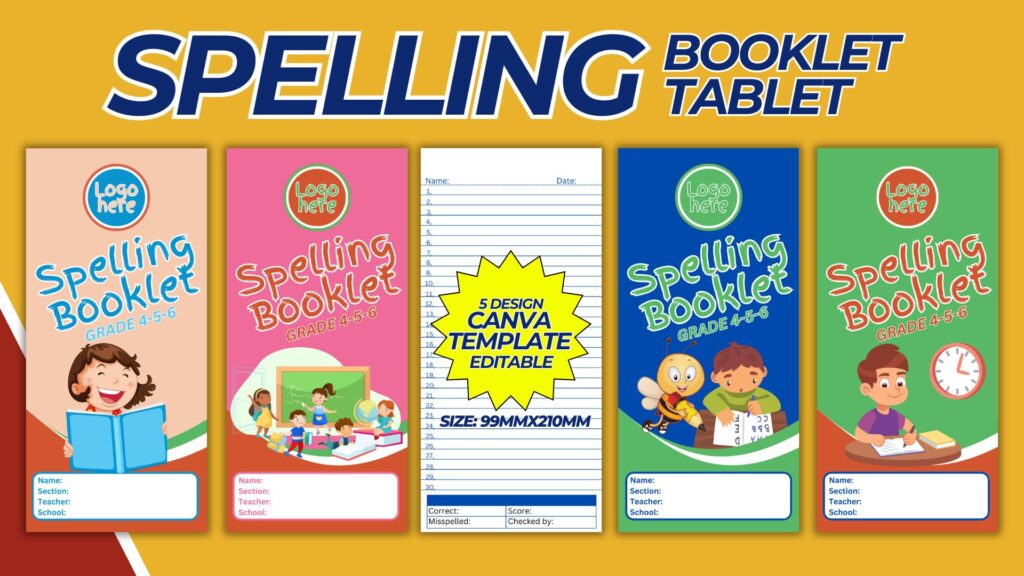
Creating a spelling booklet for grades 4, 5, and 6 can be an exciting and educational project. This booklet should be structured to enhance spelling skills while being engaging and user-friendly for students. Below is a comprehensive guide to designing a spelling booklet template, including essential sections, tips, and a detailed description.
Purpose and Benefits
Purpose:
- To provide a structured and interactive way for students to practice and improve their spelling skills.
Benefits:
- Enhances vocabulary and spelling proficiency.
- Provides a fun and engaging way for students to learn.
- Encourages consistent practice and self-assessment.
Materials and Tools Needed
- Computer with internet access.
- Design software (e.g., Canva, Adobe InDesign, Microsoft Word).
- High-quality paper and printer for physical copies.
- Binding materials if creating a physical booklet.
Structure of the Spelling Booklet
1. Cover Page:
- Title: “Spelling Booklet for Grades 4, 5, and 6.”
- Space for the student’s name, grade, and teacher’s name.
- An attractive design featuring educational and motivational images or graphics.
2. Table of Contents:
- List all sections and activities included in the booklet.
- Include page numbers for easy navigation.
3. Introduction:
- Brief overview of the importance of spelling and how to use the booklet.
- Encouraging message to motivate students.
Content Sections
4. Weekly Spelling Lists:
- Format: Each week should have a list of 10-15 words.
- Words: Select words appropriate for the grade level, including a mix of easy and challenging words.
- Space: Provide lines or space next to each word for students to practice writing.
5. Activities for Each Week:
- Activity 1: Word Definitions
- Students write the definition of each word.
- Activity 2: Sentence Creation
- Students use each word in a sentence.
- Activity 3: Word Scramble
- Provide scrambled versions of the spelling words for students to unscramble.
- Activity 4: Fill in the Blanks
- Create sentences with missing words for students to fill in using the spelling words.
6. Spelling Games and Puzzles:
- Crossword Puzzles
- Create crossword puzzles using the spelling words.
- Word Search
- Design word search puzzles where students can find the spelling words.
- Matching Games
- Have students match words with their correct definitions.
7. Review and Assessment:
- Weekly Review
- At the end of each week, include a review section where students can practice all the words from the week.
- Spelling Tests
- Provide a space for weekly spelling tests with a line for the teacher’s signature and feedback.
8. Progress Tracker:
- Chart or Graph
- Include a chart or graph for students to track their progress over the weeks.
- Reflection Section
- A space for students to reflect on their improvement and set goals.
Designing the Template in Canva
Step-by-Step Process:
- Create a Canva Account:
- Sign up for a free account at Canva.
- Start a New Design:
- Click on “Create a design” and select “Custom dimensions.” For a booklet, you might use A4 or letter size dimensions (8.5 x 11 inches).
- Cover Page Design:
- Use Canva’s templates or create your own design.
- Add the title, space for the student’s information, and educational graphics.
- Table of Contents and Introduction:
- Use Canva’s text tools to create a clean and organized layout.
- Ensure the table of contents is easy to read and navigate.
- Weekly Spelling Lists and Activities:
- Create a consistent layout for each week’s spelling list and activities.
- Use text boxes and lines to provide space for student responses.
- Games and Puzzles:
- Utilize Canva’s elements and shapes to design engaging puzzles and games.
- Ensure these sections are visually appealing and interactive.
- Review and Assessment:
- Design sections for weekly reviews and tests with clear instructions and spaces for feedback.
- Progress Tracker:
- Create a simple chart or graph using Canva’s elements.
- Include space for student reflections and goal setting.
Tips for an Effective Spelling Booklet
- Consistency: Maintain a consistent layout throughout the booklet to help students know what to expect each week.
- Engagement: Use colorful and engaging graphics to make the booklet visually appealing.
- Clarity: Ensure all instructions are clear and easy to understand.
- Variety: Include a variety of activities to cater to different learning styles.
- Feedback: Provide space for teacher feedback to guide and motivate students.
Printing and Binding
- Print the Booklet:
- Use a high-quality printer and paper to ensure durability.
- Consider printing the cover on cardstock for extra sturdiness.
- Binding Options:
- Spiral Binding: Allows the booklet to lay flat when open, making it easier to write in.
- Staple Binding: Simple and effective for thinner booklets.
- Perfect Binding: Professional-looking and suitable for thicker booklets.
- Assemble the Booklet:
- Arrange the pages in the correct order.
- Bind the booklet using your chosen method.
Conclusion
Creating a spelling booklet for grades 4, 5, and 6 is a rewarding project that can significantly enhance students’ spelling skills. By following this guide, you can design a comprehensive and engaging booklet that combines educational content with fun activities. Whether for classroom use or home study, your spelling booklet will be a valuable tool in helping students improve their spelling proficiency. Embrace the process, and enjoy seeing your students progress and succeed in their spelling journey!
NOTE: Isa isahin nyo na lang ung LINK anjan din kasi ung mga MATERIALS na pwede magamit at ung FILES.
Materials SPELLING BOOKLET GRADE 4-5-6 COVER W/LINES TEMPLATE
Click here: https://bit.ly/3Y0Z2IF
Click here: https://bit.ly/3RYUZsg
Click here: https://bit.ly/3TNClnc
Click here: https://bit.ly/4eU3zTf
Click here: https://bit.ly/3LeqsCW