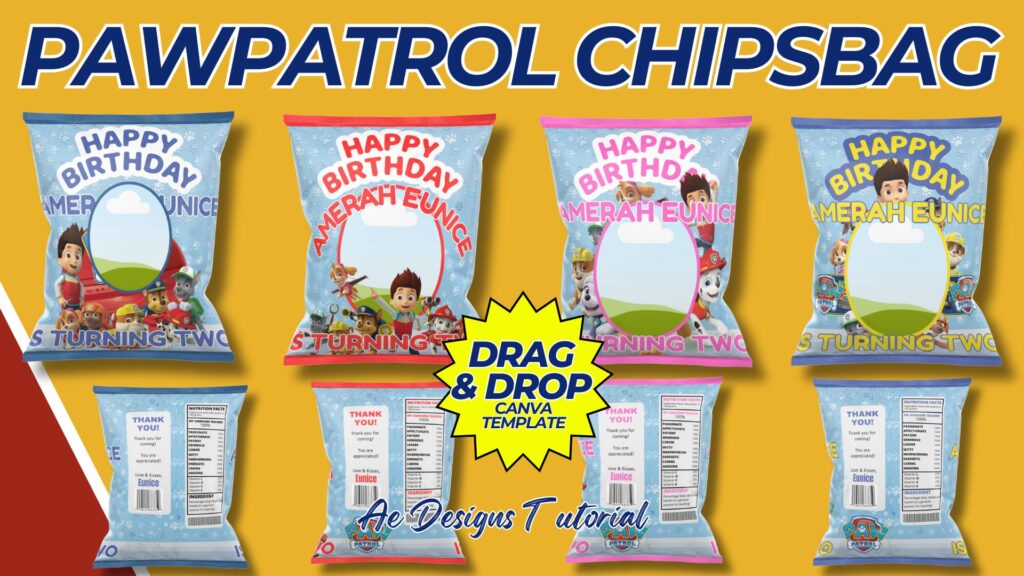
Creating a PAW Patrol-themed chips bag template involves combining fun and engaging visuals with a practical layout. This template can be used for birthday parties, themed events, or just for fun snacks. Below is a step-by-step guide to help you design a PAW Patrol chips bag template using Canva.
Purpose and Benefits
Purpose:
- To create a visually appealing PAW Patrol-themed chips bag.
- To provide a customizable template for themed parties and events.
Benefits:
- Adds a fun and personalized touch to snacks.
- Engages kids with their favorite PAW Patrol characters.
- Easy to customize and print for various occasions.
Materials and Tools Needed
- Computer with internet access.
- Canva account (free or pro version).
- High-resolution images and illustrations of PAW Patrol characters.
- Printer and durable paper for printing (e.g., glossy paper).
Designing the PAW Patrol Chips Bag Template in Canva
Step-by-Step Process:
- Create a Canva Account:
- Sign up for a free account at Canva.
- Start a New Design:
- Click on “Create a design” and select “Custom dimensions.”
- Enter the dimensions as 8.5 inches by 11 inches (standard letter size) for easy printing and folding.
- Design the Front Panel:
- Choose a colorful and engaging background that matches the PAW Patrol theme.
- Add high-quality images of PAW Patrol characters like Chase, Marshall, Skye, and Rubble.
- Include a fun title, such as “PAW Patrol Snacks” or “Chase’s Crunchy Chips.”
- Use playful fonts that are easy to read.
- Design the Back Panel:
- Keep the background consistent with the front panel.
- Add a “Nutritional Information” section with fun, fictional content (e.g., “100% Fun, 0% Boredom”).
- Include an “Ingredients” section with whimsical ingredients (e.g., “Paw Power, Adventure Flakes”).
- Add a “Distributed By” section with a PAW Patrol logo or themed address.
- Design the Side Panels:
- Add small images or icons of PAW Patrol characters or symbols.
- Include text like “PAW Patrol to the Rescue!” or “Join the Adventure!”
- Ensure Printability:
- Make sure all elements are within printable margins.
- Check that the resolution is high enough to ensure clear prints.
- Save and Download:
- Save your design and download it in a high-resolution format suitable for printing (e.g., PDF). Ensure the design remains editable within Canva for future updates.
- Print and Assemble:
- Print the template on glossy paper for a professional look.
- Cut out the template and use double-sided tape or glue to assemble the bag. Make sure to leave one side open to fill with chips or other snacks before sealing.
Sample Design Layout
Front Panel:
- Background: Colorful and engaging.
- Title: “PAW Patrol Snacks” or a similar fun title.
- Images: High-quality images of PAW Patrol characters.
Back Panel:
- Background: Consistent with the front panel.
- Nutritional Information: Fun, fictional content.
- Ingredients: Whimsical ingredients list.
- Distributed By: PAW Patrol logo or themed address.
Side Panels:
- Background: Consistent with the front and back panels.
- Images/Icons: Small images or icons of PAW Patrol characters.
- Text: Fun phrases like “PAW Patrol to the Rescue!” or “Join the Adventure!”
Conclusion
By following this guide, you can create a professional and easily printable PAW Patrol chips bag template using Canva. This template will add a fun and personalized touch to any event, engaging kids with their favorite PAW Patrol characters and providing a delightful snack experience. The customization options ensure that the chips bag can be tailored to different needs and preferences, making it a versatile and enjoyable addition to any themed party or event.
NOTE: Isa isahin nyo na lang ung LINK anjan din kasi ung mga MATERIALS na pwede magamit at ung FILES.
Materials PAWPATROL CHIPSBAG
Click here: https://bit.ly/3Y0Z2IF
Click here: https://bit.ly/3RYUZsg
Click here: https://bit.ly/4bLGOhf
Click here: https://bit.ly/3TNClnc
Click here: https://bit.ly/3LeqsCW