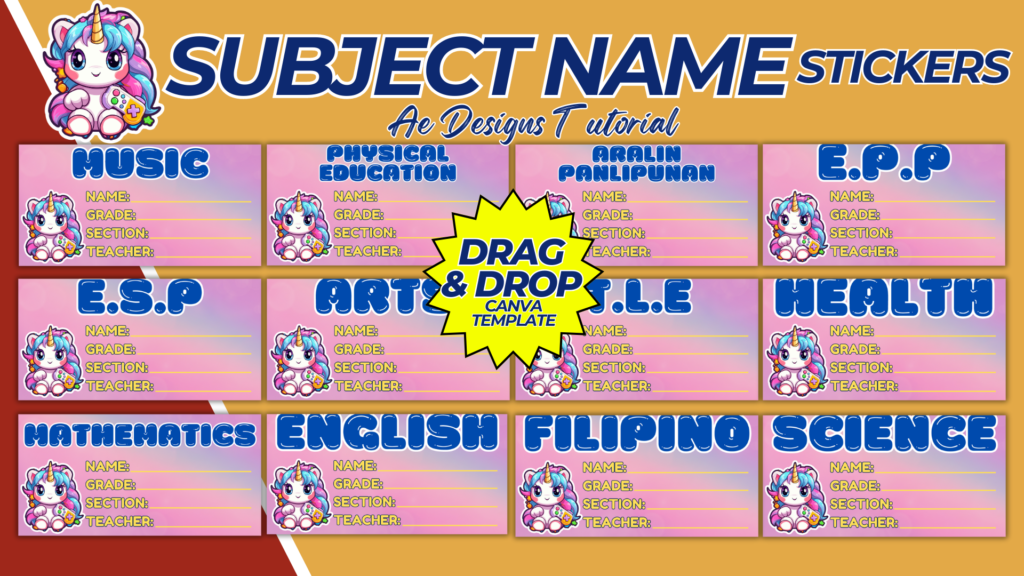
Creating subject name stickers is a great way to help students organize their notebooks, binders, and other school supplies. These stickers can be customized with different colors, fonts, and designs to make them both functional and visually appealing. Here’s how to create a subject name stickers template using Canva.
Purpose and Benefits
Purpose:
- To help students easily identify and organize their school materials by subject.
- To add a personal and decorative touch to school supplies.
Benefits:
- Promotes organization and reduces confusion.
- Enhances the aesthetic appeal of school supplies.
- Easy to use and customize for different subjects and grade levels.
Materials and Tools Needed
- Computer with internet access.
- Canva account (free or pro version) or other design software like Adobe Illustrator or Photoshop.
- High-quality sticker paper (if printing at home).
- Printer (optional if you’re printing at home).
Designing the Subject Name Stickers Template in Canva
Step-by-Step Process:
- Create a Canva Account:
- Sign up for a free account at Canva.
- Start a New Design:
- Click on “Create a design” and select “Custom dimensions.”
- Set the dimensions to the size you want for your stickers (e.g., 2 x 1 inches).
- Choose a Background:
- Select a background color or pattern for your stickers. This could be solid colors, gradients, or subtle patterns that match the school theme.
- Add Text for Subject Names:
- Create a text box and type in the subject name (e.g., “Math,” “Science,” “English”).
- Choose a font that is clear and readable. You can use different fonts to distinguish between subjects or keep a uniform font for consistency.
- Adjust the font size to fit well within the sticker dimensions.
- Customize with Icons and Graphics:
- Add relevant icons or graphics that represent each subject (e.g., a calculator for Math, a flask for Science, a book for English).
- Position these graphics next to or behind the text to create a cohesive look.
- Create Multiple Designs:
- Duplicate your sticker design and change the text and graphics for each subject.
- Use different colors or patterns for each subject to make them easily distinguishable.
- Ensure Printability:
- Make sure all elements are within the printable margins.
- Check that the resolution is high enough for clear prints.
- Save and download in a high-resolution format suitable for printing (e.g., PDF).
- Save and Print:
- Save your designs and download them as high-resolution PDFs.
- Print the stickers on high-quality sticker paper for a professional look. You can also offer the designs as digital downloads for easy access.
Sample Subject Name Stickers Layout
Design Elements:
- Background: Use solid colors, gradients, or simple patterns.
- Text: Clear and readable fonts, appropriately sized.
- Icons/Graphics: Relevant to each subject, positioned to complement the text.
Subject Examples:
- Math:
- Background: Light blue with subtle grid pattern.
- Text: “Math” in bold, dark blue font.
- Icon: Calculator graphic.
- Science:
- Background: Green gradient.
- Text: “Science” in white, modern font.
- Icon: Flask graphic.
- English:
- Background: Light yellow with polka dots.
- Text: “English” in black, serif font.
- Icon: Open book graphic.
- History:
- Background: Beige with ancient map pattern.
- Text: “History” in dark brown, classic font.
- Icon: Globe graphic.
- Art:
- Background: Light purple with paint splatter pattern.
- Text: “Art” in bold, white font.
- Icon: Paintbrush and palette graphic.
Conclusion
By following this guide, you can create a set of personalized and functional subject name stickers that will help students stay organized and add a touch of creativity to their school supplies. These stickers are easy to customize and can be printed at home or offered as digital downloads for convenient use. Whether for personal use or as a product to sell, subject name stickers are a practical and appealing addition to any student’s organizational tools.
NOTE: Isa isahin nyo na lang ung LINK anjan din kasi ung mga MATERIALS na pwede magamit at ung FILES.
Materials SUBJECT NAME STICKERS
Click here: https://bit.ly/3Y0Z2IF
Click here: https://bit.ly/3RYUZsg
Click here: https://bit.ly/3TNClnc
Click here: https://bit.ly/46uKPpp
Click here: https://bit.ly/3LeqsCW