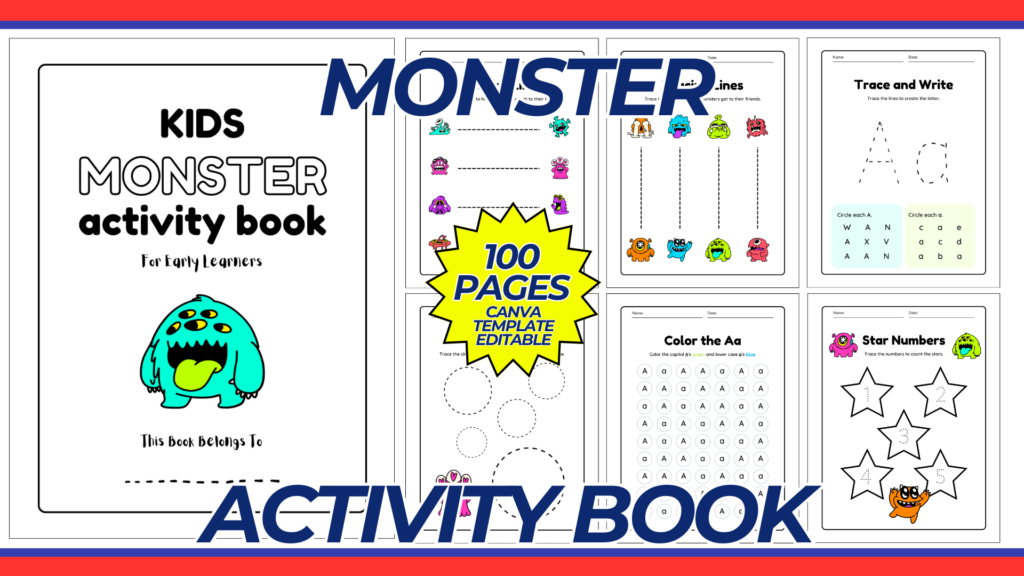
Creating a Monster Activity Book template in Canva can be a fun and engaging project. This guide will help you design a customizable template that can be used for kids’ activities such as coloring, puzzles, and educational games.
Purpose and Benefits
Purpose:
- To provide a fun and engaging activity book for children.
- To include a variety of activities such as coloring pages, puzzles, and educational games featuring monster themes.
Benefits:
- Encourages creativity and learning in a fun way.
- Easy to customize for different age groups and skill levels.
- Printable for home or classroom use.
Materials and Tools Needed
- Computer with internet access.
- Canva account (free or Pro version depending on needed features).
- Printer and high-quality paper (if printing at home).
Step-by-Step Guide to Creating the Monster Activity Book Template in Canva
1. Create a Canva Account:
- Sign up for a free account at Canva if you don’t already have one.
2. Start a New Design:
- Click on “Create a design” and select “Custom dimensions.”
- Set the dimensions to 8.5 x 11 inches (standard letter size).
3. Choose a Layout:
- Select a blank layout to start from scratch or choose a pre-designed template if available. Starting with a blank layout allows for maximum customization.
4. Design the Cover Page:
- Title: Add a bold and fun title such as “Monster Activity Book.”
- Images/Graphics: Add colorful and engaging monster illustrations. Canva has a library of graphics that you can use.
- Background: Use a colorful and playful background that complements the monster theme.
- Subtitle: Add a subtitle like “Fun Games and Activities for Kids.”
5. Create the Inner Pages:
- Table of Contents: Create a page that lists the different activities included in the book.
- Activity Pages: Design several pages with different types of activities. Here are some ideas:a. Coloring Pages:
- Use monster illustrations for children to color.
- Add simple instructions like “Color the Monster.”
- Create simple mazes with a start and finish point.
- Design connect-the-dots pages that form monster shapes.
- Alphabet tracing with monster-themed letters.
- Simple math problems with monster illustrations.
- Create pages with monster parts that kids can cut out and assemble.
6. Customize the Design:
- Fonts: Choose playful and easy-to-read fonts for headings and instructions.
- Colors: Use bright and engaging colors that attract children’s attention.
- Alignment: Ensure all elements are well-aligned and spaced evenly for a clean and organized look.
7. Add Finishing Touches:
- Page Numbers: Add page numbers to each page for easy navigation.
- Instructions: Include clear instructions for each activity.
- Credits Page: Add a page to give credit to any contributors or resources used.
8. Ensure Printability:
- Check that all elements are within the printable margins.
- Make sure the resolution is high enough for clear prints.
- Save and download the design in a high-resolution format suitable for printing (e.g., PDF).
Example Layout
1. Cover Page:
- Title: “Monster Activity Book”
- Subtitle: “Fun Games and Activities for Kids”
- Graphics: Colorful monster illustrations.
- Background: Bright and playful background.
2. Inner Pages:
- Table of Contents: List of activities included.
- Activity Pages:
- Coloring Pages: Monster illustrations to color.
- Puzzles: Mazes and connect-the-dots.
- Educational Games: Alphabet tracing, simple math problems.
- Cut-out Activities: Monster parts to cut and assemble.
3. Finishing Touches:
- Page Numbers: Added to each page.
- Instructions: Clear instructions for each activity.
- Credits Page: Credits for contributors or resources used.
Conclusion
By following this guide, you can create a fun and engaging Monster Activity Book template using Canva. This template can be customized for different age groups and skill levels, making it a versatile tool for both home and classroom use. Whether you are a parent, teacher, or caregiver, this activity book will provide hours of entertainment and learning for children.
NOTE: Isa isahin nyo na lang ung LINK anjan din kasi ung mga MATERIALS na pwede magamit at ung FILES.
Materials MONSTER ACTIVITY BOOK
Click here: https://bit.ly/3Y0Z2IF
Click here: https://bit.ly/3RYUZsg
Click here: https://bit.ly/3TNClnc
Click here: https://bit.ly/3yrQpwe
Click here: https://bit.ly/3LeqsCW