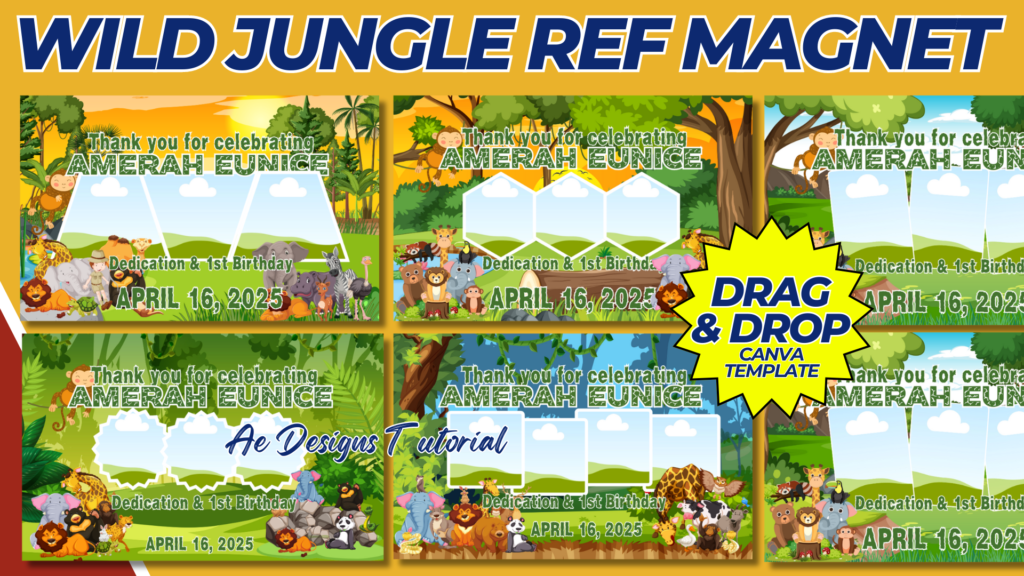
Creating a Wild Jungle Refrigerator Magnet Template is a fun and creative way to bring the jungle theme to life with vibrant animals and foliage. These magnets can be designed as fun keepsakes or decorations that are great for jungle-themed parties or educational purposes.
Here’s a step-by-step guide on how to design a Wild Jungle Ref Magnet Template:
Wild Jungle Refrigerator Magnet Template Design
Materials:
- Magnet sheets (printable or adhesive)
- Jungle animal and plant designs
- A4 paper for printing templates
- Scissors or a cutting machine (for detailed shapes)
Step 1: Choose a Jungle Theme for the Magnets
Pick a variety of wild jungle animals and tropical plants to make a set of magnets. These can include:
- Animals: Lion, tiger, elephant, zebra, giraffe, monkey, parrot, toucan, snake.
- Plants: Palm trees, tropical flowers, vines, banana leaves.
You can mix and match animals and plants, creating individual magnets or combining both in one design.
Step 2: Magnet Shape Options
There are several options for the shape of your magnets:
- Animal Silhouettes: Create outlines of jungle animals (like elephants, lions, or giraffes) to cut out and make bold, shaped magnets.
- Framed Animal Designs: Use circular, square, or jungle-leaf-shaped frames around an animal to give the magnet a distinct look.
- Jungle Scene Magnets: Combine multiple animals and plants in a single template to create a jungle scene magnet.
Step 3: Design Elements
Color and Background
- Vibrant Colors: Use bright and bold colors for animals and greenery to give the magnet a lively jungle feel.
- Detailed Textures: Incorporate textures like animal fur, leaves, or tree bark to add depth and realism to the magnets.
Animal Illustration Style
- Cartoon Style: Create fun, cartoonish jungle animals with big eyes and friendly expressions to appeal to children.
- Realistic Style: Use detailed, realistic illustrations for the animals if the magnets are intended for older kids or adults.
Text (Optional)
- Add simple phrases like “Welcome to the Jungle,” or “Safari Adventure” as part of the magnet design.
- Personalize the magnets with names or event titles if it’s for a party (e.g., “Emily’s Jungle Party”).
Step 4: Layout for the Template (A4 Size)
Create a printable A4 template that fits several magnet designs on one page for easy printing and cutting. Here’s how to arrange the template:
- Top Section: Include a small guide or labels identifying the animals or plants.
- Middle Section: Have the cut-out shapes or designs, each outlined to guide where to cut after printing.
- Bottom Section: If using text, place customizable text fields here for personalized magnets (e.g., “Name: ______”).
For example:
- Lion magnet: A circular or full-body lion design with the animal in the center.
- Zebra magnet: A zebra in a jungle background, perhaps framed with leaves.
- Monkey magnet: A monkey hanging from a vine with a vibrant green tree canopy.
Step 5: Interactive Jungle Magnets
For a more playful experience, create interactive magnets by designing individual magnet pieces that can be rearranged. For example:
- Build-a-Jungle Scene: Magnets of trees, animals, and plants that can be moved around to create different jungle scenes on the fridge.
- Animal Puzzle Magnets: Each animal cut into two or three parts (head, body, legs) so kids can put them together like a puzzle.
Step 6: Printing and Cutting
- Print: Use printable magnet sheets or print your designs on regular paper and attach them to adhesive magnetic sheets.
- Cut: Carefully cut out each animal or shape, following the lines of the template.
- Apply: Stick the printed magnet designs to the refrigerator or any magnetic surface.
NOTE: Isa isahin nyo na lang ung LINK anjan din kasi ung mga MATERIALS na pwede magamit at ung FILES.
MATERIALS & FILES: WILD JUNGLE REF MAGNET
CLICK HERE: https://bit.ly/3REjSJX
CLICK HERE: https://bit.ly/3XnoOoc
CLICK HERE: https://bit.ly/3AS2mMC
CLICK HERE: https://bit.ly/3LeqsCW
CLICK HERE: https://bit.ly/47mjmqn